


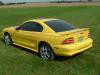
My 1994 Canary Yellow 5.0L GT
 06-20-2009, 03:53 PM
#1
1st Gear Member
Thread Starter
Join Date: Dec 2005
Location: Missouri
Posts: 57
 My 1994 Canary Yellow 5.0L GT
Scroll down
Link to new purchase... Motorcycle
https://mustangforums.com/forum/memb...honda-cbr.html
Link to new purchase... Motorcycle
https://mustangforums.com/forum/memb...honda-cbr.html
Last edited by 50nut; 03-27-2010 at 11:31 AM. Reason: Add link for bike.
 06-20-2009, 03:58 PM
#2
1st Gear Member
Thread Starter
Join Date: Dec 2005
Location: Missouri
Posts: 57
 (Scratching head)...
... I did everything to follow the pic tutorial, but the button that is supposed to be here is not... Any help?
I have a photo progression of my car since I bought it 6 years ago...
Here is the car when I bought it.
http://img132.imageshack.us/img132/6254/chriscar1.jpg
First cosmetic change.
http://img34.imageshack.us/img34/1672/p8260012.jpg
http://img10.imageshack.us/img10/308...2image0001.jpg
Tinted & bumper filled in.
http://img10.imageshack.us/img10/461...6image0005.jpg
With slicks on it. Also this is the most current pic. Of course it doesn't drive daily with Mickey's on it.
http://img196.imageshack.us/img196/1940/dscf2847c.jpg
I have a photo progression of my car since I bought it 6 years ago...
Here is the car when I bought it.
http://img132.imageshack.us/img132/6254/chriscar1.jpg
First cosmetic change.
http://img34.imageshack.us/img34/1672/p8260012.jpg
http://img10.imageshack.us/img10/308...2image0001.jpg
Tinted & bumper filled in.
http://img10.imageshack.us/img10/461...6image0005.jpg
With slicks on it
. Also this is the most current pic. Of course it doesn't drive daily with Mickey's on it.http://img196.imageshack.us/img196/1940/dscf2847c.jpg


 06-22-2009, 06:03 PM
#6
4th Gear Member
Join Date: Aug 2008
Location: Minnesota
Posts: 1,775
Looking good!

To get it like that you must use the IMAGE tags. Click on the pictures, copy/paste the URL at the top, then type these tags in this order:
beginning type: [IMG]linkgoeshere
at the end of the link type [*/IMG]
With no asterisk of course
To get it like that you must use the IMAGE tags. Click on the pictures, copy/paste the URL at the top, then type these tags in this order:
beginning type: [IMG]linkgoeshere
at the end of the link type [*/IMG]
With no asterisk of course
Last edited by maxshuty; 06-22-2009 at 06:05 PM.
06-22-2009, 07:09 PM
#7
4th Gear Member

Join Date: May 2009
Location: DFW, TX
Posts: 1,925
... I did everything to follow the pic tutorial, but the button that is supposed to be here is not... Any help?
I have a photo progression of my car since I bought it 6 years ago...
Here is the car when I bought it.
[imgl]http://img132.imageshack.us/img132/6254/chriscar1.jpg[/img]
First cosmetic change.


Tinted & bumper filled in.

With slicks on it. Also this is the most current pic. Of course it doesn't drive daily with Mickey's on it.

I have a photo progression of my car since I bought it 6 years ago...
Here is the car when I bought it.
[imgl]http://img132.imageshack.us/img132/6254/chriscar1.jpg[/img]
First cosmetic change.
Tinted & bumper filled in.
With slicks on it
. Also this is the most current pic. Of course it doesn't drive daily with Mickey's on it.
06-25-2009, 06:39 PM
#8
1st Gear Member
Thread Starter
Join Date: Dec 2005
Location: Missouri
Posts: 57
06-25-2009, 06:43 PM
#9
1st Gear Member
Thread Starter
Join Date: Dec 2005
Location: Missouri
Posts: 57
Mods