


Radio install QUICK HELP PLEASE


Thread Starter
2nd Gear Member
Joined: Jan 2008
Posts: 463
From: Texas
 Radio install QUICK HELP PLEASE
I'm trying to install my Pioneer P3100 and I've run into a few steps that confuse me. I'm using one of TocoBills writeups https://mustangforums.com/forum/2005...s-of-pics.html but I still have questions

Do the wires on the left (that connect to the head unit) attach directly to the ones on the right (that connect to the cars connector) according to their color i assume?
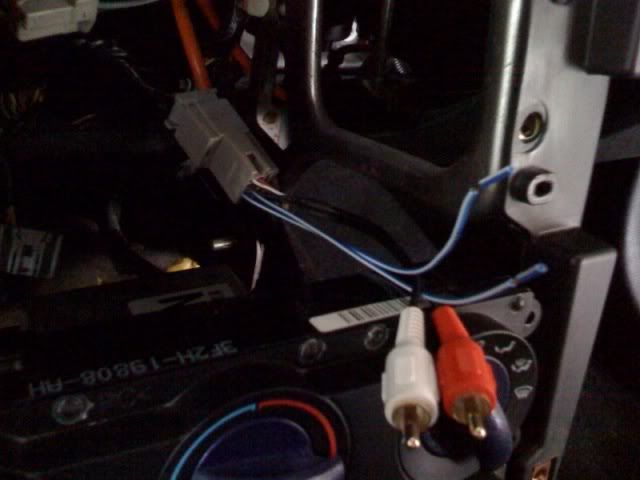
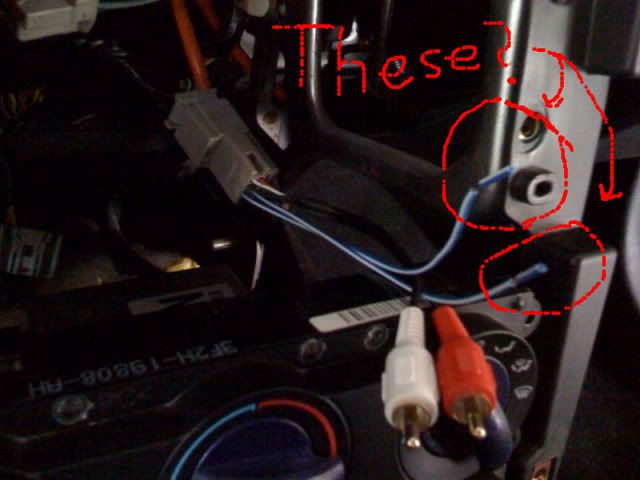
Also where do these conections go and what about the two blue wires?
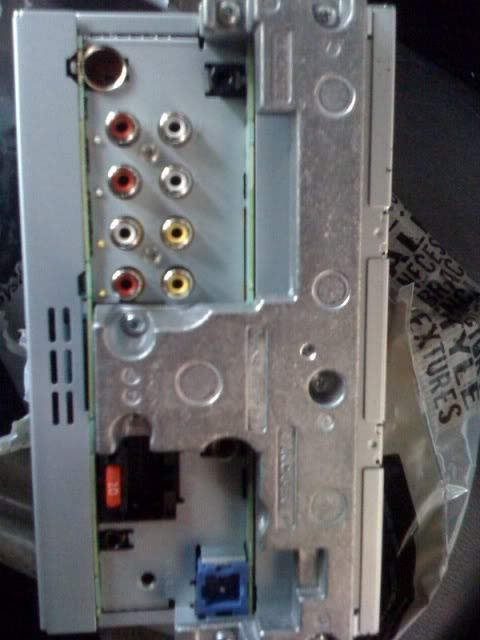
Do the wires on the left (that connect to the head unit) attach directly to the ones on the right (that connect to the cars connector) according to their color i assume?
Also where do these conections go and what about the two blue wires?

2nd Gear Member
Joined: Feb 2008
Posts: 341
From: South Carolina

Firstly, the blue wires with the white line are pretty much ALWAYS your remote connection.
Yes simply connect harness from headunit to harness from car. Match color to color. If you are running GPS off the headunit, you need to run the orange wire up to the PCM and tap into that to get GPS working.
The picture you have with the remote wire and other harness, i'm assuming that's the control plug to the shaker 500 subs in the door. Do you have the shaker 500? If so you need to connect the RCA's for those subs to your sub output on the headunit, and you have to have a small voltage regulator adapter so the subs don't pop whenever you turn the car on.
Yes simply connect harness from headunit to harness from car. Match color to color. If you are running GPS off the headunit, you need to run the orange wire up to the PCM and tap into that to get GPS working.
The picture you have with the remote wire and other harness, i'm assuming that's the control plug to the shaker 500 subs in the door. Do you have the shaker 500? If so you need to connect the RCA's for those subs to your sub output on the headunit, and you have to have a small voltage regulator adapter so the subs don't pop whenever you turn the car on.
2nd Gear Member
Joined: Apr 2008
Posts: 385
From: in ny from nj
try these links, they may help
https://mustangforums.com/m_4489289/tm.htm
https://mustangforums.com/forum/2005...ic-f900bt.html
https://mustangforums.com/m_4489289/tm.htm
https://mustangforums.com/forum/2005...ic-f900bt.html
Thread Starter
2nd Gear Member
Joined: Jan 2008
Posts: 463
From: Texas
Firstly, the blue wires with the white line are pretty much ALWAYS your remote connection.
Yes simply connect harness from headunit to harness from car. Match color to color. If you are running GPS off the headunit, you need to run the orange wire up to the PCM and tap into that to get GPS working.
The picture you have with the remote wire and other harness, i'm assuming that's the control plug to the shaker 500 subs in the door. Do you have the shaker 500? If so you need to connect the RCA's for those subs to your sub output on the headunit, and you have to have a small voltage regulator adapter so the subs don't pop whenever you turn the car on.
Yes simply connect harness from headunit to harness from car. Match color to color. If you are running GPS off the headunit, you need to run the orange wire up to the PCM and tap into that to get GPS working.
The picture you have with the remote wire and other harness, i'm assuming that's the control plug to the shaker 500 subs in the door. Do you have the shaker 500? If so you need to connect the RCA's for those subs to your sub output on the headunit, and you have to have a small voltage regulator adapter so the subs don't pop whenever you turn the car on.
Cut & Paste Expert
Joined: May 2007
Posts: 13,322
From: NW Arkansas
the middle terminal goes to ground and the right terminal is the
5V output to the ENABLE/MUTE turn-on lead of the shaker amps.
http://iihs.net/fsm/?dir=40&viewfile...Navigation.pdf
Last edited by 157dB; May 9, 2009 at 06:17 PM.
Thread Starter
2nd Gear Member
Joined: Jan 2008
Posts: 463
From: Texas
The left terminal goes to the remote turn-on from the headunit,
the middle terminal goes to ground and the right terminal is the
5V output to the ENABLE/MUTE turn-on lead of the shaker amps.
http://iihs.net/fsm/?dir=40&viewfile=Audio System, Navigation.pdf
the middle terminal goes to ground and the right terminal is the
5V output to the ENABLE/MUTE turn-on lead of the shaker amps.
http://iihs.net/fsm/?dir=40&viewfile=Audio System, Navigation.pdf

then the output (right terminal) goes the enable mute lead from ams, these?
Cut & Paste Expert
Joined: May 2007
Posts: 13,322
From: NW Arkansas
that most stereo installers used as an amplifier turn on lead.
Nowdays headunits have a power antenna lead (100mA) thats hot only when
the radio is selected and an amplifier turn on lead (1000mA) thats hot
whenever the headunit is on. It looks like what you have circled but
I cannot be sure without knowing what the instruction manual is saying
that is. The blue tag attached to it is a dead giveaway that it is
a power antenna lead or a remote turn on lead.
If that is a Shaker 500 adapter then the blue and
blue/white need to be tied together and hooked
to the right most terminal of a TO-220 LM7805 volt reg
for the Shaker 500 ENABLE/MUTE wire to be powered
by the 5V as Ford intended it to be.
Two front 500 amps (L&R) equals two ENABLE/MUTE leads
and one set (R&L) of RCA input leads.
Where did you purchase the 'adapters' and where are the instructions?
Crutchfields adapters are color coded so blue goes to blue and red goes
to red and so on. Maybe get online and search Crutchfields site for
2005-2009 wiring diagrams.
Last edited by 157dB; May 9, 2009 at 06:22 PM.
Thread Starter
2nd Gear Member
Joined: Jan 2008
Posts: 463
From: Texas
UGH!! I'm finally done lol it took me and my dad like seroisly 8 hours, but it is the first time we've ever done anything like this. It works great!!! I'm SHOCKED at how much better the speakers sound it's like not even the same car!!!
Thank you SOOOOO much
cegha
Hooraybeer
and especially you
Thank you SOOOOO much
cegha
Hooraybeer
and especially you
157db
