


ipod

Thread Starter
1st Gear Member
Joined: Feb 2010
Posts: 54
From: Arizona
 ipod
ipod
I have searched teh interwebz and forums regarding hooking up an iPod to my 06. There is a myriad of information regarding the connection which allows you to control your ipod with your stereo such as this:
http://www.icarkits.com/product_info...oducts_id=3347
But if I prefer to have a generic stereo jack, and to control my music with my ipod, I am assuming all I need is: PAC - Auxiliary Audio Input
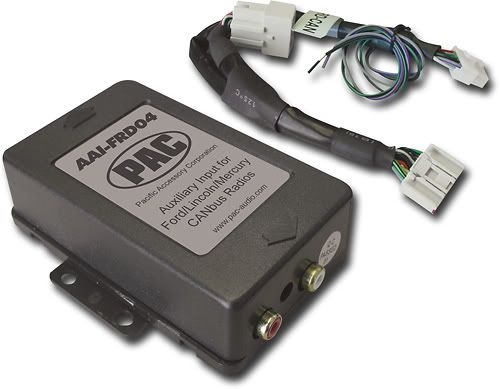
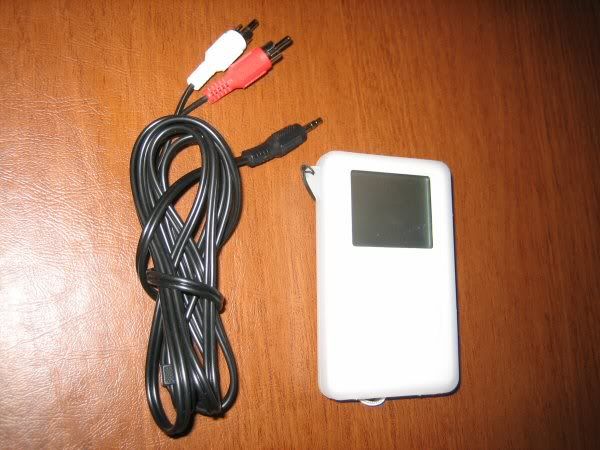
and RCA cables + ipod
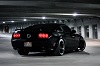
and a mustang,

Is this correct?
Thanks!
http://www.icarkits.com/product_info...oducts_id=3347
But if I prefer to have a generic stereo jack, and to control my music with my ipod, I am assuming all I need is: PAC - Auxiliary Audio Input
and RCA cables + ipod
and a mustang,
Is this correct?
Thanks!

2nd Gear Member
Joined: Jan 2010
Posts: 156
From: Colorado
Dunno... But I may be sad if so.
I noticed with the kit from that same site for a 2004 Lincoln LS I had, and ALSO for my wife's '05 Tacoma, the iPod can be controlled from EITHER end, which rocks. I'd rather use the iPod. Great interface.
But the BrandMotion ( which I ordered on Friday) does not allow this. Kinda sucks.
Also noticed the iCar Kit site charges an extra $20 for the Mustang kit compared to direct from BrandMotion.
I noticed with the kit from that same site for a 2004 Lincoln LS I had, and ALSO for my wife's '05 Tacoma, the iPod can be controlled from EITHER end, which rocks. I'd rather use the iPod. Great interface.
But the BrandMotion ( which I ordered on Friday) does not allow this. Kinda sucks.
Also noticed the iCar Kit site charges an extra $20 for the Mustang kit compared to direct from BrandMotion.

2nd Gear Member
Joined: Feb 2009
Posts: 367
From: IL - chitown
I have searched teh interwebz and forums regarding hooking up an iPod to my 06. There is a myriad of information regarding the connection which allows you to control your ipod with your stereo such as this:
http://www.icarkits.com/product_info...oducts_id=3347
But if I prefer to have a generic stereo jack, and to control my music with my ipod, I am assuming all I need is: PAC - Auxiliary Audio Input
and RCA cables + ipod
and a mustang,
Is this correct?
Thanks!
http://www.icarkits.com/product_info...oducts_id=3347
But if I prefer to have a generic stereo jack, and to control my music with my ipod, I am assuming all I need is: PAC - Auxiliary Audio Input
and RCA cables + ipod
and a mustang,
Is this correct?
Thanks!
Thread Starter
1st Gear Member
Joined: Feb 2010
Posts: 54
From: Arizona
Thanks! Just wanted to be sure before I order it 
I am always skeptical to put an aftermarket stereo in newer cars, I always found that the stock stereo works best with the factory speakers, plus it is less likely some crack head will break your window to steal it. I installed this stereo in my '68 Eldorado with some Infinity 6.5's and Soundstream 6x9's. It works great, and is nice because it charges your ipod while it is synced up too.
http://www.bestbuy.com/site/Sony+-+X...plod&cp=1&lp=5
http://www.bestbuy.com/site/Sony+-+X...plod&cp=1&lp=5

3rd Gear Member
Joined: Apr 2008
Posts: 671
From: Texas
I was going to suggest this kit but noticed the price went up to to $200. I got mine for $120 a couple years ago. It has two connections, which can be used for any two of iPod, StereoMini/RCA, or HD Radio (with additional wiring/reciever). The iPod connection allows you to control from either the head unit, or the iPod itself both while charging (except iPhone/touch). For the standard analog input it has a male StereoMini on a 6' lead and female RCA stereo input on a much shorter lead so you can plug whatever you like into that.
I'm not sure what the FRD-004 is going for nowadays, but if the costs are similar, I'd suggest the iSimple piece.
edit: The $200 price at BestBuy apparently includes installation. They're still available on eBay for $129. You'll want to look for ISFD73, if you're interested.
I'm not sure what the FRD-004 is going for nowadays, but if the costs are similar, I'd suggest the iSimple piece.
edit: The $200 price at BestBuy apparently includes installation. They're still available on eBay for $129. You'll want to look for ISFD73, if you're interested.
Last edited by Kotobuki; Feb 15, 2010 at 10:02 AM.

Thread Starter
1st Gear Member
Joined: Feb 2010
Posts: 54
From: Arizona
I was going to suggest this kit but noticed the price went up to to $200. I got mine for $120 a couple years ago. It has two connections, which can be used for any two of iPod, StereoMini/RCA, or HD Radio (with additional wiring/reciever). The iPod connection allows you to control from either the head unit, or the iPod itself both while charging (except iPhone/touch). For the standard analog input it has a male StereoMini on a 6' lead and female RCA stereo input on a much shorter lead so you can plug whatever you like into that.
I'm not sure what the FRD-004 is going for nowadays, but if the costs are similar, I'd suggest the iSimple piece.
edit: The $200 price at BestBuy apparently includes installation. They're still available on eBay for $129. You'll want to look for ISFD73, if you're interested.
I'm not sure what the FRD-004 is going for nowadays, but if the costs are similar, I'd suggest the iSimple piece.
edit: The $200 price at BestBuy apparently includes installation. They're still available on eBay for $129. You'll want to look for ISFD73, if you're interested.
http://cgi.ebay.com/ebaymotors/ws/eB...=STRK:MEWNX:IT
Thanks for all your help!
3rd Gear Member
Joined: Apr 2008
Posts: 671
From: Texas
To switch from head unit control to iPod control, once the iPod is plugged in, all you have to do is hit the AUX button and it will continue to charge but switch content control to the iPod. The radio might display "No iPod connected" in this mode, but you'll still get all your audio.
Just as an FYI, sometime during the 06 model year Ford made some changes to the Shaker head unit. There are some dipswitch settings that are different based on Early/Late build radios. This is not shown in the manual (for some reason, or at least it wasn't in mine) but the information is/was available in an FAQ from the company. A FAQ which I seem to be having trouble finding at this point... I can rustle up the proper dipswitch settings for the early build head units from my car if you'd like. Probably better to have them available sooner, rather than later, eh?
Just as an FYI, sometime during the 06 model year Ford made some changes to the Shaker head unit. There are some dipswitch settings that are different based on Early/Late build radios. This is not shown in the manual (for some reason, or at least it wasn't in mine) but the information is/was available in an FAQ from the company. A FAQ which I seem to be having trouble finding at this point... I can rustle up the proper dipswitch settings for the early build head units from my car if you'd like. Probably better to have them available sooner, rather than later, eh?
Last edited by Kotobuki; Feb 15, 2010 at 02:15 PM.
Thread Starter
1st Gear Member
Joined: Feb 2010
Posts: 54
From: Arizona
To switch from head unit control to iPod control, once the iPod is plugged in, all you have to do is hit the AUX button and it will continue to charge but switch content control to the iPod. The radio might display "No iPod connected" in this mode, but you'll still get all your audio.
Just as an FYI, sometime during the 06 model year Ford made some changes to the Shaker head unit. There are some dipswitch settings that are different based on Early/Late build radios. This is not shown in the manual (for some reason, or at least it wasn't in mine) but the information is/was available in an FAQ from the company. A FAQ which I seem to be having trouble finding at this point... I can rustle up the proper dipswitch settings for the early build head units from my car if you'd like. Probably better to have them available sooner, rather than later, eh?
Just as an FYI, sometime during the 06 model year Ford made some changes to the Shaker head unit. There are some dipswitch settings that are different based on Early/Late build radios. This is not shown in the manual (for some reason, or at least it wasn't in mine) but the information is/was available in an FAQ from the company. A FAQ which I seem to be having trouble finding at this point... I can rustle up the proper dipswitch settings for the early build head units from my car if you'd like. Probably better to have them available sooner, rather than later, eh?
http://peripheralelectronics.com/per...D73_Manual.pdf