


2007 Mustang installed trunk release


Thread Starter
1st Gear Member
Joined: Dec 2008
Posts: 88
From: New York
 2007 Mustang installed trunk release
Ladies and gentleman my trunk release installed. Please admire the awesomeness of it 

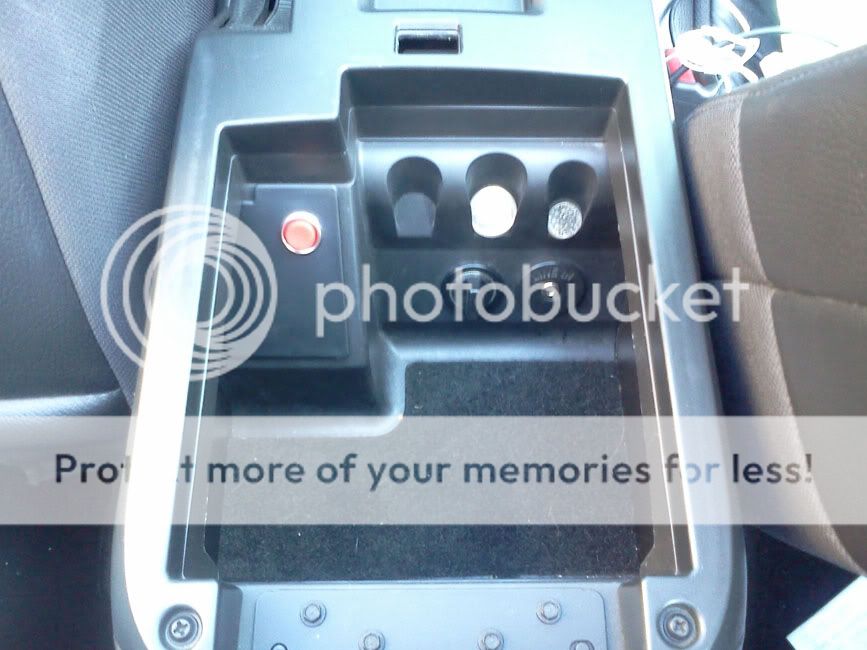
Last edited by defiance772; Aug 18, 2011 at 10:01 AM. Reason: Picture Now Included






The Paranoid One
Joined: Apr 2006
Posts: 5,320
From: Texas
There is a little box above where you type. In this box there is a button that looks like a picture. Put the URL of the webpage the picture is located at and it will load the picture on here.
You cannot ATTACH pics to messages. You will have to get a free photobucket account or something like that and upload the picture there and then put the url address in the box when you hit the little picture button above the typing box when you type a message on this forum lol
BTW:
Therefore there is NO AWESOMENESS to see!
HAD to put that in there. It's been a while since I got to post that smile in a thread lol!
You cannot ATTACH pics to messages. You will have to get a free photobucket account or something like that and upload the picture there and then put the url address in the box when you hit the little picture button above the typing box when you type a message on this forum lol
BTW:
Therefore there is NO AWESOMENESS to see!
HAD to put that in there. It's been a while since I got to post that smile in a thread lol!
Last edited by Blacksmoke; Aug 17, 2011 at 11:16 PM.

4th Gear Member
Joined: Dec 2010
Posts: 1,597
From: Gallifrey
imageshack.us ...Do eeet!
Select it with browse, click upload, copy the forum code box on the page once uploaded, paste in reply here, submit, done.
If paranoid, remove EXIF/metadata data first, likely if taken with a droid/iphone your lat/long coords will be contained in that photo's information which can be easily read by anyone. Just a quick google of "exif remove" should give you more than enough options to choose from to do this.
Select it with browse, click upload, copy the forum code box on the page once uploaded, paste in reply here, submit, done.
If paranoid, remove EXIF/metadata data first, likely if taken with a droid/iphone your lat/long coords will be contained in that photo's information which can be easily read by anyone. Just a quick google of "exif remove" should give you more than enough options to choose from to do this.
Last edited by wayne613; Aug 18, 2011 at 04:41 AM.