


Blending Question


Thread Starter
1st Gear Member
Joined: Aug 2006
Posts: 111
From:
 Blending Question
I am trying to learn some basics of photoshop. I am trying to touch up a few of my architecture projects.
The pictures I have of them show up as a black on a grayish paper, and another student used blending options to make it a brighter white background.
Well I am trying to do that again, on some of my other projects, but I cant get anything to work.
Could someone tell me how to do it.
Heres the picture, Id like to do it on my own though so I know how to do it, because I have many different pics of other projects.
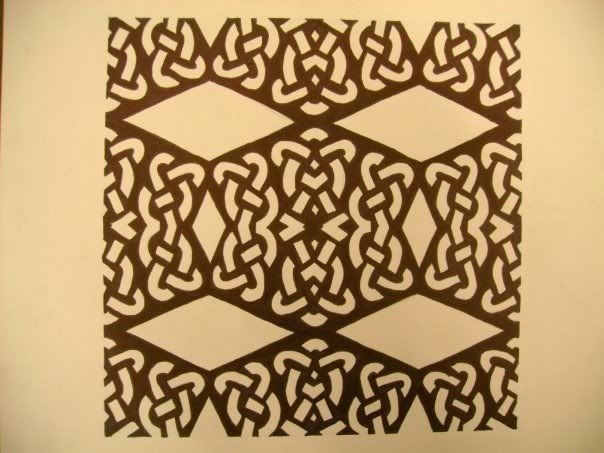
The pictures I have of them show up as a black on a grayish paper, and another student used blending options to make it a brighter white background.
Well I am trying to do that again, on some of my other projects, but I cant get anything to work.
Could someone tell me how to do it.
Heres the picture, Id like to do it on my own though so I know how to do it, because I have many different pics of other projects.
6th Gear Member
Joined: Jun 2006
Posts: 6,605
From: Orlando, FL
RE: Blending Question
Well I am not quite sure what you exactly mean, but I would suggest using the magic wand tool to select the area, and then go to Image>Adjustments>Exposure and increase the slider.

Thread
Thread Starter
Forum
Replies
Last Post
AMAlexLazarus
AmericanMuscle.com
3
Oct 2, 2015 08:06 AM
AMAlexLazarus
AmericanMuscle.com
0
Oct 1, 2015 09:21 AM
treesloth
New Member Area
4
Sep 28, 2015 07:03 AM