
Photo Edit Help

Thread Tools
 
Search this Thread
 
Old Oct 21, 2008 | 08:58 PM
  #1  
brnc_bstr87's Avatar
brnc_bstr87
Thread Starter
2nd Gear Member
 
Joined: Oct 2007
Posts: 204
From: Oklahoma
Red face Photo Edit Help

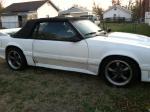
I downloaded GIMP from this forum the other day and it is my first time ever on editing. Can anyone give some help on how to add my cropped out picture of my car onto a background picture that I saved from online? Thanks in advance, Q
Old Oct 21, 2008 | 09:21 PM
  #2  
Xeno's Avatar
Xeno
'Dr. X'
 
Joined: Apr 2008
Posts: 4,388
From: Toto's Kansas
Default

don't know how gimp works, but i would imagine you could open both pics at one time, copy the cropped pic, then go to the 'background' pic and paste it into it; that's how it works in photoshop anyway
Old Oct 21, 2008 | 09:56 PM
  #3  
brnc_bstr87's Avatar
brnc_bstr87
Thread Starter
2nd Gear Member
 
Joined: Oct 2007
Posts: 204
From: Oklahoma
Default

I tried that, but when I cropped my picture it kept a white background so it's still the same size as a whole that it was. Do you understand what I'm trying to say..not too sure if I know even...lol

Old Oct 21, 2008 | 10:26 PM
  #4  
Zach333's Avatar
Zach333
3rd Gear Member
 
Joined: Jul 2008
Posts: 925
From: OREGON
Default

oh i understand.... i think

highlight the white you do not want and "CUT" it...
Old Oct 21, 2008 | 11:28 PM
  #5  
Xeno's Avatar
Xeno
'Dr. X'
 
Joined: Apr 2008
Posts: 4,388
From: Toto's Kansas
Default

what tombo said

sounds like you are taking the whole pic, not just the 'cut' selection you want
Related Topics
Thread
Thread Starter
Forum
Replies
Last Post
lovesilver
Members Mustangs
3
May 9, 2019 09:18 PM
baddog671
Archive - Parts For Sale
20
Jul 26, 2016 01:20 PM
AMAlexLazarus
AmericanMuscle.com
0
Oct 1, 2015 09:21 AM
treesloth
New Member Area
4
Sep 28, 2015 07:03 AM


All times are GMT -5. The time now is 06:37 PM.