help me with reflections


'Dr. X'
Joined: Apr 2008
Posts: 4,388
From: Toto's Kansas

is this the kind of reflection you mean?

if so, all i do is when i have the 'arrow/pointer' tool selected (the one that allows you to move layers and anything selected), hold down ctrl and the little pointer (the one that shows up when you resize the selected object manually) will turn sort of a gray color instead of black. that will allow you to manipulate just the 'corners' of the object instead of the whole thing.
(hopefully that made sense, i was in a hurry writing it )
)
if so, all i do is when i have the 'arrow/pointer' tool selected (the one that allows you to move layers and anything selected), hold down ctrl and the little pointer (the one that shows up when you resize the selected object manually) will turn sort of a gray color instead of black. that will allow you to manipulate just the 'corners' of the object instead of the whole thing.
(hopefully that made sense, i was in a hurry writing it
)

Thread Starter
6th Gear Member
Joined: Mar 2007
Posts: 5,726
From: Slidell, Louisiana
I just did this quickly, it doesn't look like a reflection but you get the point.

the front at back wheels don't touch and if I rotate it, it just looks rotated, not as if the reflection is directly under the car.
Xeno, on a side shot, I get that part, it's when the car is angled like above it throws me for a loop.
the front at back wheels don't touch and if I rotate it, it just looks rotated, not as if the reflection is directly under the car.
Xeno, on a side shot, I get that part, it's when the car is angled like above it throws me for a loop.
'Dr. X'
Joined: Apr 2008
Posts: 4,388
From: Toto's Kansas
the same rule should apply, though. rotate to have the front and rear wheels align, then use the ctrl shortcut to 'pull' the outer angles away and shrink/stretch the as needed. then set the layer opacity to somewhere in the 45-65% range. finally, use the eraser with a 'fuzzy' brush at about 20-25% opacity to erase the parts that look weird or out of place and to smooth out the edges at the 'top' of the reflection (top of the car that is ). i usually find the reflection looks better on a dark background too. this effect isn't really the easiest to get the hang of right off the bat; it takes a lot of trial and error to get right.
like so (and this is by no means perfect):

). i usually find the reflection looks better on a dark background too. this effect isn't really the easiest to get the hang of right off the bat; it takes a lot of trial and error to get right.like so (and this is by no means perfect):
Thread Starter
6th Gear Member
Joined: Mar 2007
Posts: 5,726
From: Slidell, Louisiana
maybe I'm not describing it right. I want to do something like this 


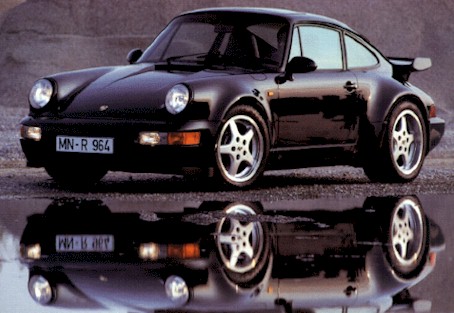

where the reflection is directly under the car, not off to the side like you did.
where the reflection is directly under the car, not off to the side like you did.
Last edited by 01GT4.6; May 7, 2009 at 07:55 AM.

★★★★★
Joined: May 2005
Posts: 10,200
From: Banned Camp (Counselor)
i dont know that its even possible for a reflection on the ground to show the entire side of the car, off to the side, like the way xeno did it... at least ive never seen a real reflection ever look like that.
you can always go into transform mode, and use the "Warp" mode to tweak it to where you want it. but obviously, its going to distort the image, and the more you warp it, the more it will blur and distort.
you can always go into transform mode, and use the "Warp" mode to tweak it to where you want it. but obviously, its going to distort the image, and the more you warp it, the more it will blur and distort.
'Dr. X'
Joined: Apr 2008
Posts: 4,388
From: Toto's Kansas
yeah, i think the only way to get a reflection like that is to have a real low angle photo of the car. in the pics you had, the first and third are actual reflections; i don't think there would be a way to photoshop a reflection at that angle because the actual shot of the car is at a high angle (if that makes sense). you might be able to fake the second one, but again the angle of the car might be too high; if you look, you can see the bottom of the 'nose' of the car in the reflection which would be a little hard to replicate with the actual car at such a high angle. now, the fourth one you might be able to replicate since the angle is lower; which in that case you would probably use the 'ctrl distort' method.
i think i'm going to try replicate the second and fourth pics just for fun
i think i'm going to try replicate the second and fourth pics just for fun
'Dr. X'
Joined: Apr 2008
Posts: 4,388
From: Toto's Kansas
here's the land rover one. the closer i looked at it, the more i think the whole thing was designed via computer; so the reflection of artificially generated too. if it is a real picture of a land rover, and they reflected it using photoshop, then there was a little bit of trickery involved; there was no way i could get all the wheels aligned without cutting, pasting, and painting a little bit; particularly the back/passenger side wheels. but the end result is pretty close, imo.

the cobra, on the otherhand, i think was shot using a mirror underneath it. the reflection of the bumper/nose is near impossible to replicate just using photoshop; so either the reflection is real by using a mirror, or it was rendered using some sort of cad software. there's my two cents
the cobra, on the otherhand, i think was shot using a mirror underneath it. the reflection of the bumper/nose is near impossible to replicate just using photoshop; so either the reflection is real by using a mirror, or it was rendered using some sort of cad software. there's my two cents