


Chop Idea Sharing Thread


'Dr. X'
Joined: Apr 2008
Posts: 4,388
From: Toto's Kansas

basically, all i do is 'trace' where i want the stripes to go with a selection tool, copy and paste that selected area, then alter the hue/saturation (if it is a 'colored car') or use the paint tool a few times on a low opacity if the car is originally black or white. it's not much of a description, but that's basically all there is to it 

Chop Mod
Joined: Sep 2010
Posts: 3,333
From: OK
This is a sig I made for my Fiance for his cobalt forum.
Could you guys give me any tips on how to make his car and bike stand out a little more w/o losing the fire effect.
And how do you guys make some of the sig background transparent?

Could you guys give me any tips on how to make his car and bike stand out a little more w/o losing the fire effect.
And how do you guys make some of the sig background transparent?
'Dr. X'
Joined: Apr 2008
Posts: 4,388
From: Toto's Kansas
two things you can do to make the background transparent: either save as a .png file without a background (basically just delete it), or when you save as a .jpg set the photoshop background color # to e6e5ea (which is red 230, blue 229, green 234).
as for the bike and car, if they are a separate layer, maybe try using an emboss/bevel effect, or an outer glow.
as for the bike and car, if they are a separate layer, maybe try using an emboss/bevel effect, or an outer glow.
'Dr. X'
Joined: Apr 2008
Posts: 4,388
From: Toto's Kansas
^^^ i can give a little tutorial 
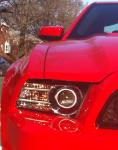
the most important thing (and i know this sounds rather obvious) is to find a large pic of the hood you want at an angle that matches your car. if you're lucky, you can just copy the hood you want, paste it onto your car, adjust the colors a bit, and you're done. some are a tad more difficult.
sometimes, you may be able to find a hood about the right angle, but for whatever reason, it doesn't 'match' perfectly. in that case, try to get the contours to flow as close as possible, trim/delete the outer portion of the hood you are chopping up to the 'outline' of your car's actual hood, color match as close as possible, then 'blend' the new hood into the old by erasing (with a low opacity, ~30-35%) the outer edge of the chopped hood.
there will still be times where something still doesn't 'match'; for example, there might be tree limbs or something reflecting on the chopped hood, and there is absolutely nothing like that on the pic of your car, you may need to do additional blending (i actually had to do this with your hood chop recently). the best case scenario for a good end result is if the hood on 'your car' is the stock hood. basically copy a section of the original hood, paste it over the new hood (there should be at least 3 layers at this point), then trim the excess so what you just pasted follows the lines of the new hood. at this point, just do some blending to help it 'flow' better.
hopefully that made sense. practice is still the best way to figure some of this out, but if there are any questions, don't hesitate to ask
the most important thing (and i know this sounds rather obvious) is to find a large pic of the hood you want at an angle that matches your car. if you're lucky, you can just copy the hood you want, paste it onto your car, adjust the colors a bit, and you're done. some are a tad more difficult.
sometimes, you may be able to find a hood about the right angle, but for whatever reason, it doesn't 'match' perfectly. in that case, try to get the contours to flow as close as possible, trim/delete the outer portion of the hood you are chopping up to the 'outline' of your car's actual hood, color match as close as possible, then 'blend' the new hood into the old by erasing (with a low opacity, ~30-35%) the outer edge of the chopped hood.
there will still be times where something still doesn't 'match'; for example, there might be tree limbs or something reflecting on the chopped hood, and there is absolutely nothing like that on the pic of your car, you may need to do additional blending (i actually had to do this with your hood chop recently). the best case scenario for a good end result is if the hood on 'your car' is the stock hood. basically copy a section of the original hood, paste it over the new hood (there should be at least 3 layers at this point), then trim the excess so what you just pasted follows the lines of the new hood. at this point, just do some blending to help it 'flow' better.
hopefully that made sense. practice is still the best way to figure some of this out, but if there are any questions, don't hesitate to ask
4th Gear Member
Joined: Aug 2007
Posts: 1,154
From: New York City
I don't know how active this thread still is but I was wondering if anyone can help Photoshop a picture of the 2010+ Street Scene sideskirts with the Cervinis side exhaust? I have a few ideas floating through my head.