
TOPDON CarPal OBD2 Scanner: Pro Features for DIYers

The TOPDON CarPal OBD2 Scanner is a Bluetooth device that connects to your smartphone, allowing it to scan every Mustang module for trouble codes.
Full disclosure: this TOPDON CarPal OBD2 scanner first look is a sponsored post.
If you own an SN95 or newer Mustang, you already know how much BOTH hot rodding and diagnosing Mustang problems require an OBD2 scanner to talk to all of the various computer modules. But which OBD2 scanner to choose? Ultimately this comes down to a DIYer’s personal budget and two important questions —
- How many modules can it scan?
- How many functions can it perform (aka resets & bidirectional commands)?
Typically, cheaper models are less capable, and the more you spend, the more features you get. But there’s a new line of OBD2 scanners that manage to deliver more accessibility than scanners used to at entry-level prices.

The TOPDON CarPal is a surprisingly powerful OBD2 scanner at $60 (currently on sale for $40 at TOPDON’s website). It offers whole vehicle scanning, a premium feature, along with several important functions. The CarPal itself is a Bluetooth dongle that connects to the OBD2 diagnostic port (aka a DLC) found on all 1996 and newer automobiles. This dongle then interfaces with the CarPal app, which acts as the system’s brain and controller. This purchase price includes the dongle along with one year of service (access to all auto brands). After year one, it turns into a $29.99/year subscription service.
Click HERE to purchase the TOPDON CarPal on Amazon!
Click HERE to purchase directly from TOPDON!
(Currently on sale for $40)
TOPDON CarPal Features & Specifications

- Wireless Bluetooth OBD2 scanner
- Requires downloading the CarPal app (Android 7.0 or above, iOS 11.0 or above)
- Current price: $60
- 1-Year of service included with purchase ($29.99/yr after that)
- AutoVIN identificationon
- Battery testing & monitoring
- 4-in-1 Live Data stream recording & replaying
- 6 vehicle functions (Oil Reset, Throttle Adaptation, EPB Reset, BMS Reset, TPMS Reset, DPF Regeneration)
- Acceleration testing (measure 0-60 mph times, etc.)
- I/M Readiness testing (will your vehicle pass an emissions test?)
- OBD Diagnostic Trouble Codes (DTC) repair guide
- Technical Service Bulletins (TSBs)
- DLC locator (where is my OBD2 diagnostic port in my vehicle?)
- Warning light library
- Supports 98% of vehicle models made from 1996 to 2023
- Bluetooth 5.0
- Connection range: 33 feet/10 m
- Devices supported: Android 7.0 or above, iOS 11.0 or above
- Working Temperatures: 14 ℉ ~ 122 ℉
- Dimensions: 3.31″ x 1.98″ x 1.07″
- Weight: 2.75 oz
- Warranty: 1 Year
CarPal Videos
Head over to TOPDON’s YouTube channel to find a full playlist of 26 CarPal videos.
Set-Up

To use the TOPDON CarPal, you need three things.
- The physical CarPal itself
- The CarPal app installed on an iOS or Android mobile device
- An OBD2-era car or truck
Once installed on a phone or tablet, and your account set up, plug the CarPal into the OBD2 port (aka DLC) on your vehicle and follow the various prompts in the CarPal app. To make sure everything works smoothly, you’ll need a stable internet connection (cellular or WiFi) and to download a digital catalog for each brand of vehicle you plan to scan (Ford, Chevy, Dodge, Lexus, Audi, etc.).
Once, connected, the CarPal app offers multiple ways to interact with your vehicle.
Whole Vehicle Scan

While early OBD2 cars had one or two computers (aka modules), modern vehicles use separate computer modules for every imaginable system. Engine, transmission, HVAC, radio, suspension, airbags and other safety systems, anti-lock brakes, you name it. Many cheap OBD2 scanners can only access the very basic systems. But the TOPDON CarPal can scan every computer in your car.
Whole-vehicle scans allow CarPal to find every computer module on the vehicle and report back if there are any fault or diagnostic trouble codes pending, present, or stored in each module. The CarPal app then generates a report for DIYers to read, which can also be shared digitally via email.
The one caveat to this is that, as you’ll find with any ODB2 scanner, it typically takes one to two years for the current model year (aka 2024 or newer vehicles) to be included in the system.
4-in-1 Live Data
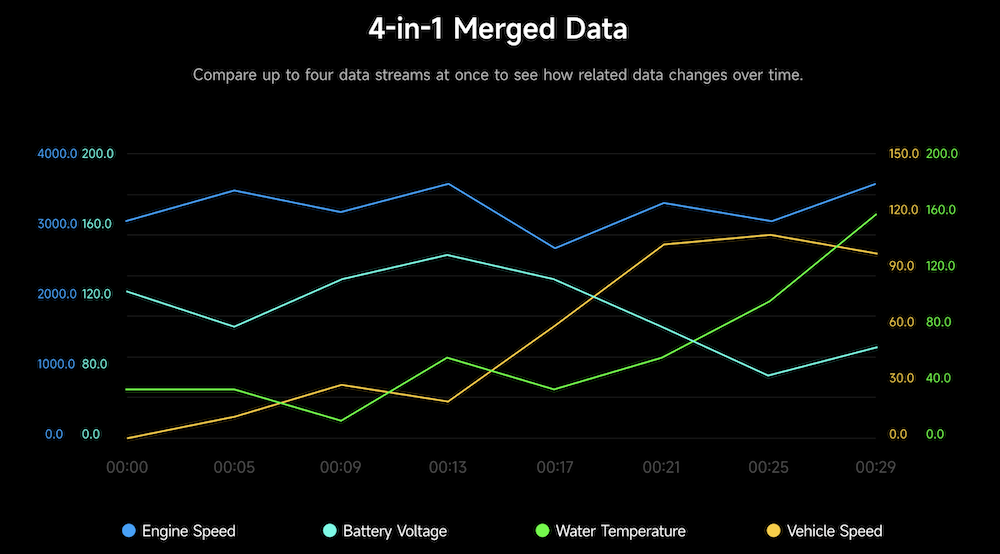
If you’re a more experienced DIYer, the TOPDON CarPal allows users to access vehicle Live Data while an automobile is running. Basically, if there’s a sensor on the vehicle collecting data — O2, wheel speed, coolant temp, trans temp, engine speed, fuel trims, misfire counters, and more — you’ll be able to watch, record, and replay up to four separate data streams simultaneously, which can help streamline the diagnostic process to see if anything is operating outside of normal parameters.
I/M Readiness
I/M Readiness tells you if your vehicle is ready to pass an emissions or SMOG test. Effectively, modern cars look for a variety of emissions monitors (O2 sensors, EVAP system sensors, etc.) to make sure they’re turned on and functioning correctly.
If your vehicle fails this test, or if the monitors have yet to turn on because you recently disconnected the vehicle’s battery, you may need to seek a repair, or keep driving, before attempting to pass an emissions test. If these systems or monitors have failed completely, you’ll often see a Check Engine light.
6 Vehicle Functions

CarPal includes six “essential reset functions” that are helpful when performing vehicle maintenance. They include —
- Oil Reset: Resets your oil monitor and/or service reminder lights
- TPMS Reset: Calibrates your tire pressure monitoring system after rotating or installing new tires
- EPB Reset: Resets electronic parking brakes after pad replacements
- BMS Reset: Resets the battery management system after installing a new battery
- Throttle Adaptation: Recalibrates the throttle body (often required after a battery replacement)
- DPF Regeneration (for Diesel engines): helps keep the Diesel Particulate Filter (DPF) clean
With six total functions, CarPal is positioned above basic scanners, which typically offer two or four functions, but below more expensive scanners, which offer eight or more functions. Unfortunately, there are no bi-directional controls, which are more advanced versions of calibrations and resets for various systems and modules.
Still, it’s pretty good for a $60 scanner.
Battery Tester
Since modern vehicles have never been more computer-reliant, healthy electrical systems — a combination of the alternator and the battery — are vital for maintaining proper vehicle functionality. The TOPDON CarPlay offers a built-in battery testing functionality that will warn you if your battery is getting too old or weak so that you don’t ever have to wake up one morning with a dead battery.
Vehicle Performance Test
Want to know how fast your car is from 0 to 60 mph? The TOPDON CarPal uses a vehicle’s speed data to monitor and record 0-to-60-mph acceleration runs. This can also be helpful in diagnosing the overall performance and efficiency of a vehicle under wide-open throttle.
[Editor’s Note: Please only use this function in safe, controlled, off-road environments away from other vehicles and pedestrians.]
Service

In the CarPal’s service menu, you’ll find four different features —
- OBD Diagnostic Trouble Codes (DTC) repair guide: tips and suggestions for fault codes meanings, and ways to repair the problem(s)
- Technical Service Bulletins (TSBs): a database of common TSBs issued for your vehicle, which can help with diagnosis and repair
- DLC locator: where is my OBD2 diagnostic port in my vehicle?
- Warning light library: a glossary of common warning lights on vehicle dashboards
First Impressions

Although we’ve yet to use CarPal personally, we have thoroughly tested TOPDON’s TopScan OBD2 scanner, TopScan Moto motorcycle OBD2 scanner, ArtiDiag500 OBD2 scanner, V2200Plus jump starter, and the BT300P battery tester. Each, despite a few criticisms, performed as advertised and was easy to use.
Priced at $60, CarPal is an affordable and powerful device that delivers features that used to cost hundreds of dollars — whole vehicle scans, battery testing, performance testing, and reset functions. And, based on watching a few tutorials from the company’s YouTube page (see below), the newer CarPal app appears more refined and fluid than the company’s earlier mobile applications.
However, it’s important to know that you’re not getting a fully professional device. CarPal lacks bidirectional control, which offers more advanced tests, calibrations, and reset functions on certain vehicles. For additional features, you’d need to step up to something like the TOPDON TopScan, or a more expensive standalone scanner.
Still, for its entry-level price, CarPal offers a lot of performance for the money and seems worth considering for less experienced DIYers.
Click HERE to purchase the TOPDON CarPal on Amazon!
Click HERE to purchase directly from TOPDON!
Images: TOPDON

You must be logged in to post a comment.